---
title: "⭐ Immunizations: An Overview"
description: This overview explains how to create, update, and review patient immunization records in Aeon, including reminders and workflow tips.
---
[Skip to content](https://help.aeon.health/immunizations-an-overview#main-content)
English
Show submenu for translations
[Contact us](https://help.aeon.health/kb-tickets/new?hsLang=en)
[](https://aeon.health)
Open main navigation
Close main navigation
- English
Show submenu for translations
- [Contact us](https://help.aeon.health/kb-tickets/new)
- [Aeon's Status Page](https://status.aeon.health/)
[Aeon's Status Page](https://status.aeon.health/)
How can we help you?
- There are no suggestions because the search field is empty.
1. [Aeon Health Help Center](https://help.aeon.health/?hsLang=en)
2. [Aeon Features](https://help.aeon.health/aeon-features?hsLang=en)
3. [Immunizations](https://help.aeon.health/aeon-features?hsLang=en#immunizations)
May 15, 2026
# ⭐ Immunizations: An Overview
## Guide to tracking, recording and managing patient Immunizations in Aeon
**In This Article**
[Description](https://help.aeon.health/immunizations-an-overview#desc)
[Location](https://help.aeon.health/immunizations-an-overview#loc)
[Use](https://help.aeon.health/immunizations-an-overview#use)
🔹[View a Patient's Immunizations](https://help.aeon.health/immunizations-an-overview#viewsc)
🔹[Create Immunizations](https://help.aeon.health/immunizations-an-overview#crscr)
🔹[Create Immunizations within Chart Notes (Embeds)](https://help.aeon.health/immunizations-an-overview#embed)
🔹[Edit an Immunization](https://help.aeon.health/immunizations-an-overview#editscr)
🔹[Archive an Immunization](https://help.aeon.health/immunizations-an-overview#archscr)
🔹[View Archived Immunizations](https://help.aeon.health/immunizations-an-overview#viewarch)
🔹[Restore Archived Immunizations](https://help.aeon.health/immunizations-an-overview#restarch)
[Permissions](https://help.aeon.health/immunizations-an-overview#perm)
Description
The Immunizations feature is designed to help your team quickly create, track, and manage patient Immunization records as part of everyday care. You can capture detailed vaccine information, monitor statuses like “Administered” and any recorded reactions, set up reminders, and review a clear history of changes and comments with the timeline view.
With this feature, you’ll typically:
- Create Immunization records from chart notes or directly from the Immunization Index
- View Immunization details, including vaccine type, dose, date, and status
- Edit and update Immunization records, including administered status and reactions
- Use automatically generated Tasks as reminders for vaccines that are due within 2 weeks
- Archive outdated or incorrect Immunization records
- Access the timeline for a complete audit trail of historical actions and comments
---
Location
Immunizations are a key part of preventive care and can be easily created, reviewed, and managed in a few ways:
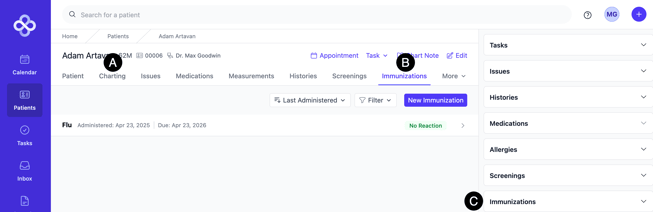
**A. Chart Notes:** These can be created and edited during patient visits
**B. Immunization Index:** This offers a consolidated view of all patient Immunizations, with options to create, edit, or archive records
**C. Patient Sidebar:** Provides quick access to recent Immunizations during patient interactions
---
### Use
Below, we will cover all the features of and how to use Immunizations.
---
##### View a Patient's Immunizations
1. Open the **Patient Profile**
2. See the Immunizations in the right-hand sidebar
3. Click the **dropdown arrow** to see all the details
3. Click the **name** of the Immunization to expand it
👉 Note the three icons to the right of the Immunization: Timeline, Delete, and Edit.
---
##### Create Immunizations
1. Open the **Patient Profile**
2. Click on the **Immunizations** sub-tab
3. Click **New Immunization**
4. Enter the information
- Under "Type" choose Other to enter an Immunization free form. Otherwise, choose from the list.
5. Click **Create**
---
##### Create Immunizations within Chart Notes (Embeds)
1. Open the **Patient Profile**
2. Click **Charting**
3. **Create** your Chart Note
4. Within the Chart Note, start to type **/immunization** and choose it from the dropdown:
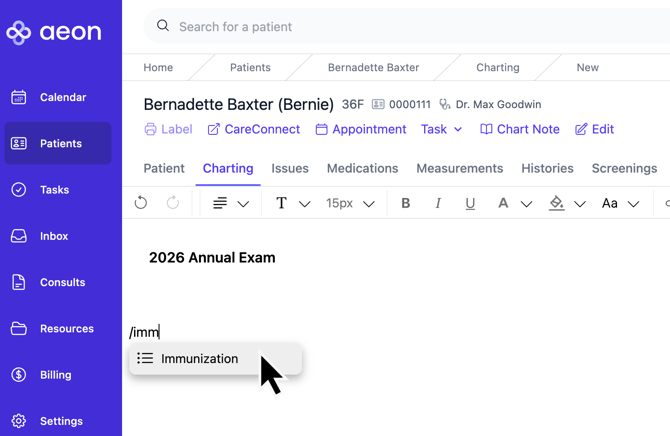
5. Fill out the fields and then continue with your chart note
**🎓 Training Tip: Creating Chart Notes**
For full instructions on creating Chart Notes, [click here.](https://help.aeon.health/how-to-create-chart-notes?hsLang=en)
---
##### Edit an Immunization
1. Open the **Patient Profile**
2. Click on the **Immunizations** sub-tab
3. Find the Immunization you wish to edit
4. Click on the **name** of the Immunization
5. Click on the **Edit icon** to the right of the Immunization
6. Make your changes
7. Click **Save**
---
##### Archive an Immunization
Instead of deleting Immunizations, Aeon gives you the ability to archive Immunizations, removing them from active view. These archived Immunizations can be viewed or restored if desired.
1. Open the **Patient Profile**
2. Click on the **Immunizations** sub-tab
3. Find the Immunization you wish to edit
4. Click on the **name** of the Immunization
5. Click on the **archive icon** to the right of the Immunization
6. View the confirmation message about Archiving the Immunization
7. Click **Confirm**
---
##### View Archived Immunizations
1. Open the **Patient Profile**
2. Click on the **Immunizations** sub-tab
3. Click the line "**Show # Archived Immunization**" (located under the list of your Immunizations
4. Click on the name of the Immunization to see the details
---
##### Restore an Archived Immunization
1. Open the **Patient Profile**
2. Click on the **Immunization** sub-tab
3. Click the line "**Show # Archived Immunization**" (located under the list of your Immunizations
4. Click on the name of the Immunization to see the details
5. Click the **Unarchive icon** to the right of the Immunization
---
### Permissions
- **Practitioners:** View, create, edit, archive, and leave comments
- **Staff:** View, create, edit, and leave comments
- [Get Started](https://help.aeon.health/get-started?hsLang=en#main-content)
- [Quickstart Checklists ( ✅ Start Here! )](https://help.aeon.health/get-started?hsLang=en#quickstart-checklists-start-here)
- [Training](https://help.aeon.health/training?hsLang=en#main-content)
- [Practitioner Training](https://help.aeon.health/training?hsLang=en#practitioner-training)
- [30 Minute Onboarding](https://help.aeon.health/training?hsLang=en#30-minute-onboarding)
- [Aeon Features](https://help.aeon.health/aeon-features?hsLang=en#main-content)
- [Aeon Basics](https://help.aeon.health/aeon-features?hsLang=en#aeon-basics)
- [Allergies](https://help.aeon.health/aeon-features?hsLang=en#allergies)
- [Audit Exports](https://help.aeon.health/aeon-features?hsLang=en#audit-exports)
- [Billing: General](https://help.aeon.health/aeon-features?hsLang=en#billing-general)
- [Billing: Fee-For-Service (FFS) BC](https://help.aeon.health/aeon-features?hsLang=en#billing-fee-for-service-ffs-bc)
- [Billing: Longitudinal Family Physician (LFP) BC](https://help.aeon.health/aeon-features?hsLang=en#billing-longitudinal-family-physician-lfp-bc)
- [Calendar](https://help.aeon.health/aeon-features?hsLang=en#calendar)
- [Charting](https://help.aeon.health/aeon-features?hsLang=en#charting)
- [Consults](https://help.aeon.health/aeon-features?hsLang=en#consults)
- [Files](https://help.aeon.health/aeon-features?hsLang=en#files)
- [Histories](https://help.aeon.health/aeon-features?hsLang=en#histories)
- [Immunizations](https://help.aeon.health/aeon-features?hsLang=en#immunizations)
- [Inbox](https://help.aeon.health/aeon-features?hsLang=en#inbox)
- [Issues](https://help.aeon.health/aeon-features?hsLang=en#issues)
- [Measurements](https://help.aeon.health/aeon-features?hsLang=en#measurements)
- [Medications & Prescriptions](https://help.aeon.health/aeon-features?hsLang=en#medications-prescriptions)
- [Patient Profile](https://help.aeon.health/aeon-features?hsLang=en#patient-profile)
- [Requisitions](https://help.aeon.health/aeon-features?hsLang=en#requisitions)
- [Resources](https://help.aeon.health/aeon-features?hsLang=en#resources)
- [Settings](https://help.aeon.health/aeon-features?hsLang=en#settings)
- [Screenings](https://help.aeon.health/aeon-features?hsLang=en#screenings)
- [SRFax Integration](https://help.aeon.health/aeon-features?hsLang=en#srfax-integration)
- [Tasks](https://help.aeon.health/aeon-features?hsLang=en#tasks)
- [Settings](https://help.aeon.health/settings?hsLang=en)
[](https://aeon.health)
[mailto:email@email.com](mailto:email@email.com)
Copyright © 2024, Aeon Health