---
title: Review & Acknowledge New Patient Files
description: Follow these steps to review new patient files assigned to you in Aeon, acknowledge or dismiss them, and create follow‑up tasks or measurements.
---
[Skip to content](https://help.aeon.health/how-to-review-new-patient-documents#main-content)
English
Show submenu for translations
[Contact us](https://help.aeon.health/kb-tickets/new?hsLang=en)
[](https://aeon.health)
Open main navigation
Close main navigation
- English
Show submenu for translations
- [Contact us](https://help.aeon.health/kb-tickets/new)
- [Aeon's Status Page](https://status.aeon.health/)
[Aeon's Status Page](https://status.aeon.health/)
How can we help you?
- There are no suggestions because the search field is empty.
1. [Aeon Health Help Center](https://help.aeon.health/?hsLang=en)
2. [Aeon Features](https://help.aeon.health/aeon-features?hsLang=en)
3. [Patient Profile](https://help.aeon.health/aeon-features?hsLang=en#patient-profile)
January 28, 2026
# Review & Acknowledge New Patient Files
## Workflow for practitioners to review and acknowledge new Files assigned to them
### Environment
- Practitioner Role
### Instructions
Incoming [Files](https://help.aeon.health/documents-an-overview?hsLang=en) to your clinic can be [assigned to you for review by staff](https://help.aeon.health/how-to-manage-the-inbox-and-assign-for-review?hsLang=en)and include incoming faxes, mail, and email attachments. Staff must assign the Files to Practitioners for their review. If this is not completed by staff, all new incoming faxes can be found in the Inbox (if a SR Fax connection is established), and any mail or email attachments would need to be uploaded to Aeon.
When Files are assigned to a Practitioner, a **File Review Task** is generated by the system.
1\. Click **Tasks** in the left column
2\. By default, you are looking at **All of your Tasks**, which includes your File Review Tasks OR you can click on File Review to be taken to just those types of Tasks
3\. Click the **title** of the File
The File Details will appear on the right side of the screen (if your screen is minimized, then expand it):
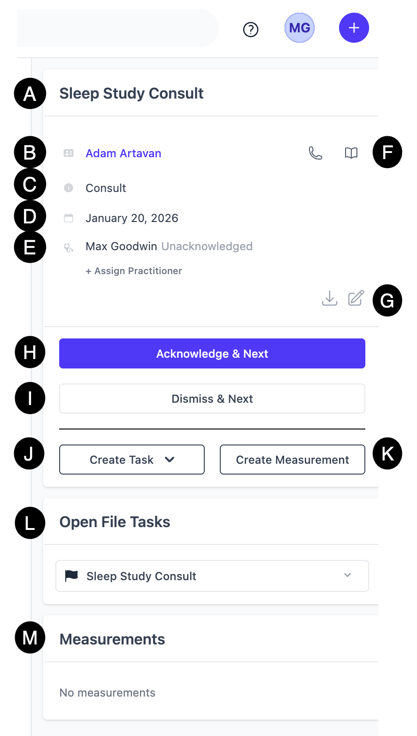
**A. Title:** The title of the File
**B. Patient:** The Patient that is linked to this File.
**Warning ⚠️: Files assigned to the incorrect Patient**
We are aware there is currently no ability to change the Patient if a File is associated with the incorrect Patient. We will address this going forward. In the interim, [follow these steps](https://help.aeon.health/change-the-patient-linked-to-a-file?hsLang=en) to address this issue.
**C. File Category:** The category that has been assigned to the File.
**D. Observation Date:** When the File comes in to the inbox and is the the assignment phase, this information can be entered or it will default to the date that the File arrives in the Inbox.
**E. The Practitioner assigned:** If incorrect, click **Assign to Practitioners** and choose a different Practitioner to assign the File for review.
**F.** **Contact icons:** Use these icons to reveal the patient's phone number, or start a new Chart Note.
**G. Actions:** Use these icons to download the File or edit this File Detail panel.
**H. Acknowledge & Next:** If you have responsibility/ownership for this File choose this option once you are done reviewing the File. After you Acknowledge the File, it will be removed from your list to review. Additionally, this will "complete" the related Task assigned to you. Of course, you can access it anytime in the File tab of the associated patient or by filtering your Task page to show Completed Tasks.
**I. Dismiss & Next**: If you are assigned a File but in fact, you do NOT have ownership/responsibility, you would choose this option to have the staff re-assign this to a different practitioner. This will show up in the timeline with your name and "Dismissed" noted. **Please see the warning below.**
**Warning ⚠️:** We are currently aware of an issue where, when the Dismiss and View Next option is chosen, the File is not restored to the New \> Inbox for staff to assign out to a different practitioner. To work around this in the interim, click on **Assign to Practitioners \> type the name/choose from list \> Assign \> Dismiss and View Next.**
**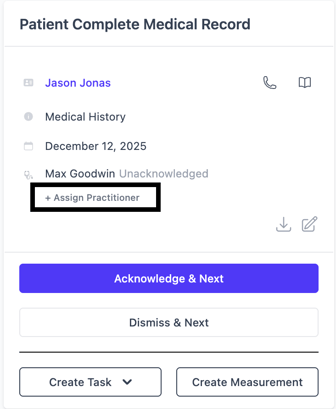**
When you do so, "Dismissed" will appear next to your name, and it will be assigned to the Tasks of the new Practitioner:
**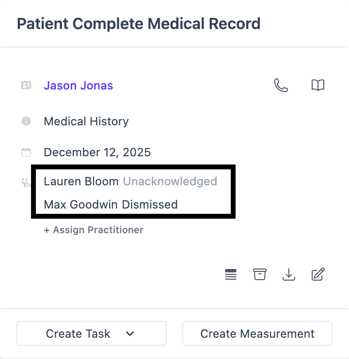**
**J. Create Task:** Use this option to create a General Task or a Booking Task for staff.
**K. Create Measurement:** Create a [Measurement](https://help.aeon.health/measurements-an-overview?hsLang=en)directly into the Patient Profile.
**L. Open File Tasks:** See the Tasks associated with this specific File. You can click the ⭐ to watch the Task.
**M. Measurements:** Information entered from Step K will show here.
4\. Click **Save**
5\. Move on to the next File
- [Get Started](https://help.aeon.health/get-started?hsLang=en#main-content)
- [Quickstart Checklists ( ✅ Start Here! )](https://help.aeon.health/get-started?hsLang=en#quickstart-checklists-start-here)
- [Training](https://help.aeon.health/training?hsLang=en#main-content)
- [Practitioner Training](https://help.aeon.health/training?hsLang=en#practitioner-training)
- [30 Minute Onboarding](https://help.aeon.health/training?hsLang=en#30-minute-onboarding)
- [Aeon Features](https://help.aeon.health/aeon-features?hsLang=en#main-content)
- [Aeon Basics](https://help.aeon.health/aeon-features?hsLang=en#aeon-basics)
- [Allergies](https://help.aeon.health/aeon-features?hsLang=en#allergies)
- [Audit Exports](https://help.aeon.health/aeon-features?hsLang=en#audit-exports)
- [Billing: General](https://help.aeon.health/aeon-features?hsLang=en#billing-general)
- [Billing: Fee-For-Service (FFS) BC](https://help.aeon.health/aeon-features?hsLang=en#billing-fee-for-service-ffs-bc)
- [Billing: Longitudinal Family Physician (LFP) BC](https://help.aeon.health/aeon-features?hsLang=en#billing-longitudinal-family-physician-lfp-bc)
- [Calendar](https://help.aeon.health/aeon-features?hsLang=en#calendar)
- [Charting](https://help.aeon.health/aeon-features?hsLang=en#charting)
- [Consults](https://help.aeon.health/aeon-features?hsLang=en#consults)
- [Files](https://help.aeon.health/aeon-features?hsLang=en#files)
- [Histories](https://help.aeon.health/aeon-features?hsLang=en#histories)
- [Immunizations](https://help.aeon.health/aeon-features?hsLang=en#immunizations)
- [Inbox](https://help.aeon.health/aeon-features?hsLang=en#inbox)
- [Issues](https://help.aeon.health/aeon-features?hsLang=en#issues)
- [Measurements](https://help.aeon.health/aeon-features?hsLang=en#measurements)
- [Medications & Prescriptions](https://help.aeon.health/aeon-features?hsLang=en#medications-prescriptions)
- [Patient Profile](https://help.aeon.health/aeon-features?hsLang=en#patient-profile)
- [Requisitions](https://help.aeon.health/aeon-features?hsLang=en#requisitions)
- [Resources](https://help.aeon.health/aeon-features?hsLang=en#resources)
- [Settings](https://help.aeon.health/aeon-features?hsLang=en#settings)
- [Screenings](https://help.aeon.health/aeon-features?hsLang=en#screenings)
- [SRFax Integration](https://help.aeon.health/aeon-features?hsLang=en#srfax-integration)
- [Tasks](https://help.aeon.health/aeon-features?hsLang=en#tasks)
- [Settings](https://help.aeon.health/settings?hsLang=en)
[](https://aeon.health)
[mailto:email@email.com](mailto:email@email.com)
Copyright © 2024, Aeon Health