
Environment
- Practitioner Role
- Staff Role
Instructions
⚠️: We are aware that currently you are unable to edit the name of a patient linked to a File. This is the current workaround.
1. Open the File on your screen
2. On the right side of the screen, click the download icon, found in the File Details:
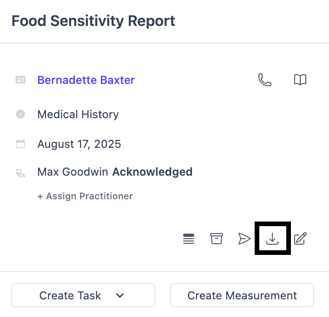
3. Now that you have a copy of the File on your computer, Archive the File by clicking on the archive icon (in the same area you found the download icon)
4. Click the timeline icon (located to the left of the archive icon)
5. Enter a comment about the File associated with the wrong patient
6. Post the comment
7. Go to the correct Patient Profile
8. Go to Files
9. Click New Upload
10. Upload the File previously saved to your computer